

Hosted Checkout Overview
End-to-end hosted checkout — payment links, card, Mada, and Apple Pay.
Hosted Checkout Overview
The Hosted Checkout integration is the recommended way to accept online payments with DigetPay. Your application creates a payment session, receives a redirectUrl, redirects the customer to the DigetPay hosted payment page, and verifies the payment result after checkout.
With Hosted Checkout, sensitive payment data never passes through your application, helping reduce PCI DSS scope while providing a secure and optimized payment experience.
New to DigetPay? Complete the Quick Start guide first, then return here for the complete Hosted Checkout workflow.
Recommended integration: Hosted Checkout provides the fastest implementation with the lowest PCI compliance requirements.
Why choose Hosted Checkout?
Card data is securely collected and processed by DigetPay. Your servers never receive PAN, CVV, or Apple Pay tokens.
Create a payment session, redirect the customer, and verify the payment status using only a few API calls.
Support cards, Mada, Apple Pay, and additional payment methods without implementing each payment flow yourself.
Includes 3D Secure authentication, payment status tracking, refunds, and webhook notifications.
Payment Flow
End-to-end payment lifecycle
sequenceDiagram
    autonumber
    participant Merchant as Your Server
    participant API as DigetPay API
    participant Customer
    participant Checkout as Hosted Checkout
    participant Gateway

    Merchant->>API: Create Payment Link
    API-->>Merchant: redirectUrl

    Merchant->>Customer: Redirect customer
    Customer->>Checkout: Complete payment

    Checkout->>Gateway: Process transaction
    Gateway-->>Checkout: APPROVED / DECLINED

    Checkout-->>Customer: successUrl / failureUrl

    API->>Merchant: Webhook (recommended)

    Merchant->>API: Query Transaction Status

    opt Refund
        Merchant->>API: Process Refund
    end
Critical: Your server must always confirm payment using the Transaction Status API or a webhook. A redirect to
successUrldoes not guarantee that the payment succeeded.
Integration Steps
1. Create a payment session
Your server creates a Hosted Checkout session and receives a redirectUrl for the customer.
See Create Payment Link for the API details.
2. Redirect the customer
Redirect the customer to the redirectUrl returned by DigetPay.
The checkout page is fully hosted by DigetPay. You do not need to build an iframe or embed card fields in your application.
3. Customer completes payment
The customer selects an available payment method and completes the payment on the DigetPay hosted checkout page.
Additional authentication, such as 3D Secure, is handled as part of the checkout experience when required.
4. Verify the payment
After checkout completes, verify the payment using the Transaction Status API or a webhook notification before fulfilling the order.
Never rely only on the browser redirect or
successUrlto determine payment success.
5. Process refunds (Optional)
Use the Refund API whenever a full or partial refund is required.
What the Customer Sees
The customer pays on the hosted page returned by redirectUrl. Your server never receives the customer's card data.
flowchart LR
  A[Your store] -->|Redirect| B[DigetPay Checkout]
  B --> C[Select payment method]
  C --> D[Pay]
  D --> E[successUrl / failureUrl]
The hosted checkout page is rendered by DigetPay after the customer is redirected to redirectUrl.
Checkout Page
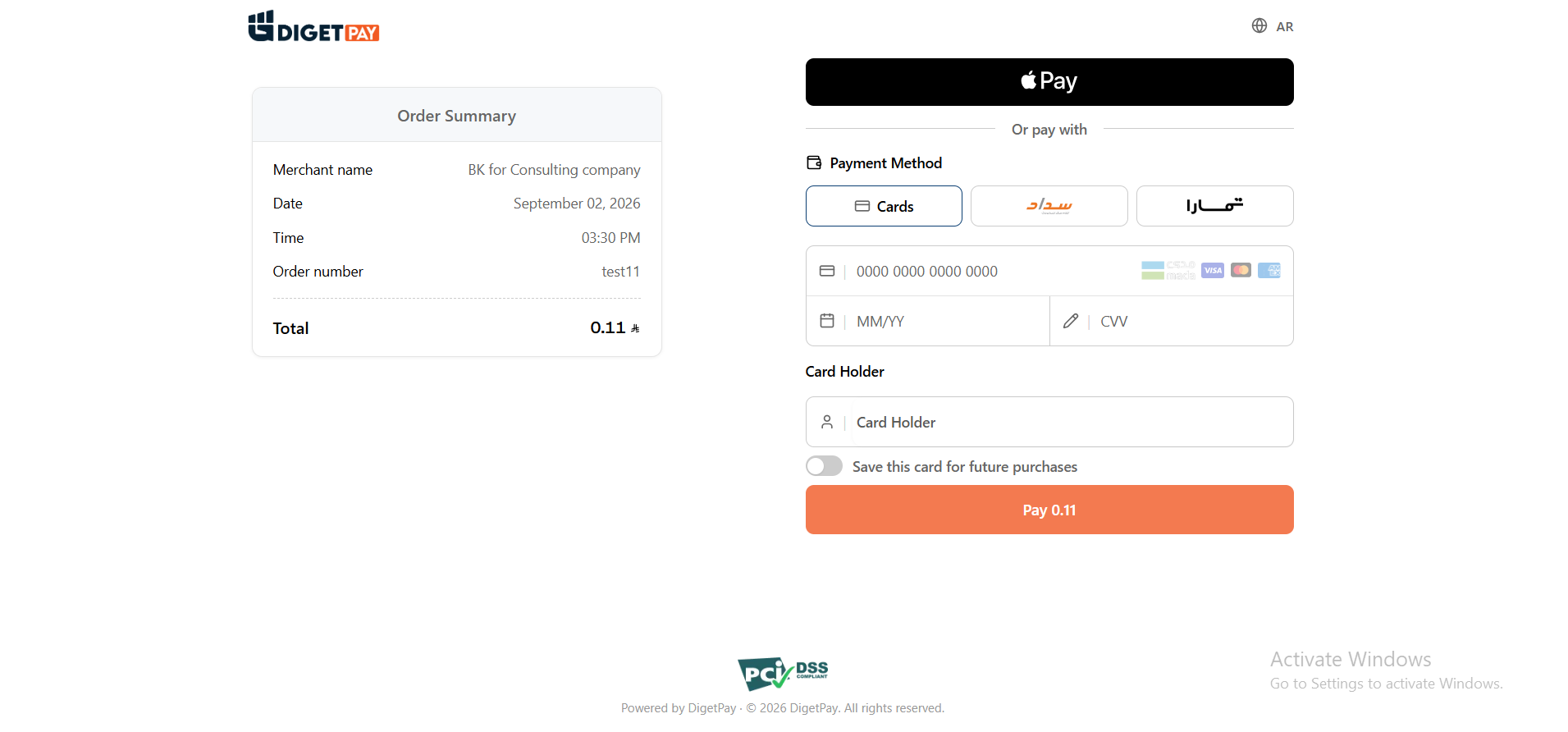
The customer can:
- Review the payment amount and order information.
- Select an available payment method.
- Complete additional authentication such as 3D Secure when required.
- Complete the payment and return to the merchant application.
Send
customerPhonewhen creating the payment link if you want Apple Pay to be available on checkout.
PCI benefit: Card entry, 3-D Secure, and Apple Pay are handled on DigetPay infrastructure rather than by your application.
Payment Methods Available
| Method | Supported Networks | Notes |
|---|---|---|
| Card | Visa, Mastercard, Mada, Amex | 3-D Secure when required by issuer |
| Saved Card | Prior cards for returning customers | Same email at link creation |
| Apple Pay | Safari / iOS | Requires customerPhone at link creation |
See Payment Methods for more details.
Your Integration Responsibilities
| You Build | DigetPay Builds |
|---|---|
| Create payment link | Checkout UI |
Redirect to redirectUrl | Card / Mada form |
| Handle return URLs | 3-D Secure |
| Confirm payment via status API/webhook | Apple Pay button |
See Hosted Checkout Code for implementation examples.
Fin Staging URLs
| Outcome | Recommended URL |
|---|---|
| Success | https://fin-admin.digetpay.com/pay/checkout/success |
| Failure | https://fin-admin.digetpay.com/pay/checkout/failure |
On production, use your own HTTPS success and failure URLs.
Best Practices
- Always verify payments using the Status API or Webhooks.
- Store the gateway transaction ID for future operations such as refunds.
- Include
customerPhonewhen creating payment links to support Apple Pay and other payment methods. - Never fulfill orders directly from the
successUrl. - Never handle or store card data in your application when using Hosted Checkout.
- Use Fin Staging to test your integration before moving to production.
- Verify your webhook endpoint before processing live transactions.
API Reference
Next Steps
Related Guides
For production deployment, complete the Go-Live Checklist and verify your webhook endpoint before processing live transactions.
Updated about 1 month ago