

Recurring Payments
Recurring Payments allow merchants to automatically charge a customer for future payments after the initial payment has been successfully authorized.
DigetPay supports two recurring payment models:
- Scheduled Recurring
- Unscheduled Recurring
Both models use a payment token generated from the customer's initial payment, allowing future charges without collecting the customer's card details again.
The first payment is always initiated by the customer. Future recurring payments use the recurring token generated during the initial transaction.
How Recurring Payments Work
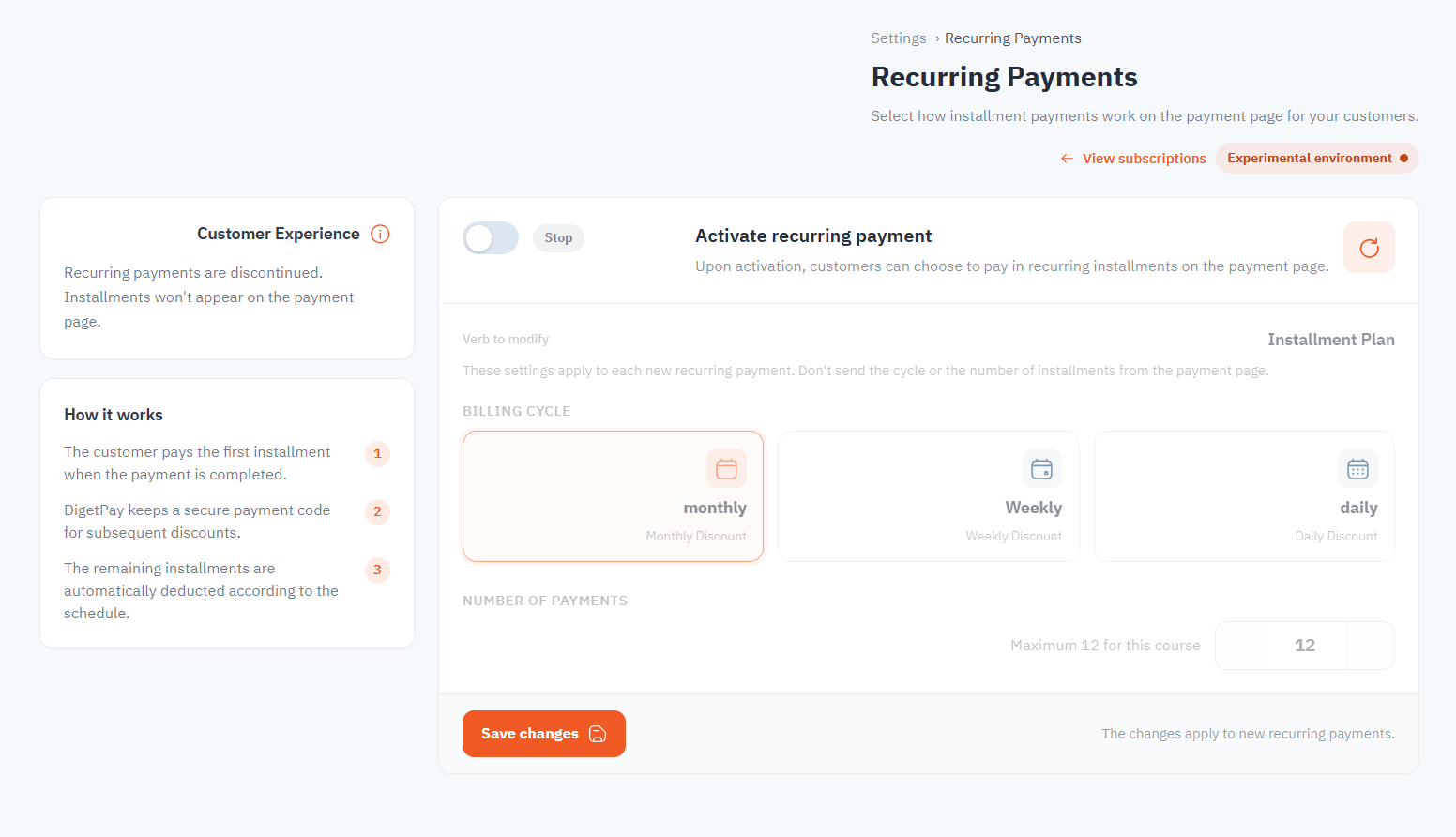
The merchant can configure recurring payment settings directly from the Merchant Dashboard.
Available configuration includes:
- Enable or disable recurring payments.
- Billing cycle.
- Number of installments.
- Customer payment experience.
These settings apply automatically to newly created recurring payment plans.
Recurring Payment Flow
sequenceDiagram
    autonumber

    participant Customer
    participant Merchant
    participant DigetPay
    participant Gateway

    Customer->>Merchant: First payment
    Merchant->>DigetPay: Create initial payment
    DigetPay->>Gateway: Process payment
    Gateway-->>DigetPay: Approved
    DigetPay-->>Merchant: Payment approved + recurringToken

    Note over Merchant: Store recurringToken securely

    loop Future recurring payments
        Merchant->>DigetPay: Charge recurringToken
        DigetPay->>Gateway: Process recurring payment
        Gateway-->>DigetPay: Result
        DigetPay-->>Merchant: Success / Failed
    end
Recurring Payment Types
Scheduled Recurring
Scheduled recurring payments occur automatically on a predefined schedule.
Typical examples include:
- Monthly subscriptions
- Weekly memberships
- Daily services
- Installment plans
The billing cycle and number of payments are configured before the subscription starts.
Example
| Plan | Value |
|---|---|
| Billing Cycle | Monthly |
| Number of Payments | 12 |
| First Payment | During checkout |
| Remaining Payments | Automatically every month |
Scheduled recurring payments provide a predictable payment schedule for both merchants and customers.
Unscheduled Recurring
Unscheduled recurring payments do not follow a fixed schedule.
Instead, the merchant initiates future charges whenever a new payment is required.
Common use cases include:
- Utility bills
- Pay-as-you-go services
- Metered billing
- Usage-based pricing
- Variable subscription amounts
Since there is no predefined schedule, each recurring payment is initiated by the merchant whenever applicable.
Customers authorize future recurring charges during the initial payment. Subsequent payments use the stored recurring token without requiring the customer to provide card details again.
Merchant Dashboard Configuration
The Merchant Dashboard allows merchants to configure recurring plans without sending installment information during checkout.
Supported configuration includes:
| Setting | Description |
|---|---|
| Enable Recurring | Enable or disable recurring payments |
| Billing Cycle | Daily, Weekly, Monthly |
| Number of Payments | Maximum installment count |
| Customer Experience | Installment presentation on checkout |
Do not send the billing cycle or installment count from your checkout request. DigetPay automatically applies the configuration configured in the Merchant Dashboard.
Scheduled Payment Timeline
timeline

    title Monthly Subscription Example

    Checkout : Customer completes first payment

    Month 1 : First installment

    Month 2 : Automatic payment

    Month 3 : Automatic payment

    ...

    Month 12 : Final installment
Initial Payment
The customer completes the first payment normally using the checkout page or Embedded Integration.
During this payment:
- Customer authentication is performed.
- Payment authorization is completed.
- DigetPay generates a recurring payment token.
- The merchant receives the recurring token for future charges.
Treat the recurring token as a sensitive credential. Store it only on your secure merchant backend and restrict access to authorized services.
Future Payments
Future recurring payments use:
- The recurring token generated during the initial payment
- The original transaction reference
- Merchant API credentials
The customer's card information is not collected again.
Future recurring charges must be initiated from the merchant's secure backend using the Recurring API.
API Request Example
The following example shows a recurring charge using the token generated during the initial sale:
{
  "transactionId": "c09fba3c-59e2-434a-9ec1-5d2e71a44a8d",
  "recurringToken": "token_from_initial_sale",
  "amount": 50,
  "order": {
    "number": "ORD-REC-001",
    "amount": 50,
    "currency": "SAR",
    "description": "Monthly subscription"
  }
}
Request Fields
| Field | Description |
|---|---|
transactionId | Reference to the original transaction associated with the recurring payment token. |
recurringToken | Token generated during the initial payment and used for subsequent recurring charges. |
amount | Amount to be charged for the recurring payment. |
order.number | Merchant order/reference number for the recurring payment. |
order.amount | Amount associated with the order. |
order.currency | Currency of the recurring payment, such as SAR. |
order.description | Description of the recurring payment or order. |
Example Response
{
  "code": 200,
  "message": "Success",
  "errorCode": null,
  "data": {
    "transactionId": "cd84d742-fe91-4592-b063-63c475b4479a",
    "acquirerPaymentId": "07076929474363397274",
    "amount": "50",
    "message": "Recurring transaction successful",
    "status": "APPROVED",
    "orderId": "ORD-REC-001",
    "recurringToken": "TKN-718c06a0-ccb4-4f48-9ef4-8cba2c7750b8"
  }
}
Response Fields
| Field | Description |
|---|---|
code | API response code. |
message | General response message. |
errorCode | Error code returned when the request fails; null for a successful request. |
data.transactionId | DigetPay transaction ID generated for the recurring payment. |
data.acquirerPaymentId | Payment reference returned by the acquiring/payment provider. |
data.amount | Amount processed for the recurring transaction. |
data.message | Description of the recurring transaction result. |
data.status | Recurring transaction status, such as APPROVED. |
data.orderId | Order reference associated with the recurring transaction. |
data.recurringToken | Recurring payment token associated with the transaction. |
Use the
transactionIdreturned for the recurring charge when tracking, reconciling, or querying the transaction status.
Handling the Result
After submitting a recurring payment:
- Check the API response and transaction status.
- Store the returned
transactionIdfor transaction tracking and reconciliation. - Monitor the corresponding webhook notification.
- Verify the final transaction status using the Transaction Status API when required.
- If the payment fails, apply your merchant retry or customer notification policy.
PCI-DSS and Token Security
Using a recurring payment token means that subsequent payments do not require the merchant to collect the customer's raw card details again. However, tokenization does not automatically remove all PCI-DSS responsibilities.
The merchant remains responsible for protecting the recurring token and maintaining the security controls applicable to its payment environment and integration model.
At minimum:
- Store recurring tokens securely on the merchant backend.
- Do not store card numbers, CVV/CVC, or other sensitive authentication data.
- Never expose recurring tokens in browser code or mobile applications.
- Do not include recurring tokens in URLs, application logs, error messages, or analytics data.
- Restrict access to recurring tokens to authorized services and personnel.
- Apply appropriate security controls to protect stored tokens from unauthorized access.
- Follow the merchant's applicable PCI-DSS requirements and compliance obligations.
A recurring token should not be treated as ordinary application data. Protect it as a sensitive credential and use it only for the intended recurring payment flow.
PCI-DSS scope depends on the merchant's complete payment architecture and integration model. Tokenization may reduce the merchant's exposure to cardholder data, but it does not by itself determine the merchant's PCI-DSS obligations. Consult your PCI-DSS assessor or qualified security provider for your specific compliance requirements.
Best Practices
- Store recurring tokens securely on your backend.
- Never expose recurring tokens to browsers or mobile applications.
- Use recurring tokens only from your backend.
- Never store raw card details or CVV/CVC for recurring payments.
- Do not log recurring tokens or include them in URLs.
- Monitor webhook notifications for recurring payment results.
- Verify transaction status when reconciliation or confirmation is required.
- Handle failed recurring payments according to your business rules.
- Apply appropriate access controls to recurring payment credentials.
Related Documentation
Updated about 1 month ago