

03 - Customizing your Marketplace Listing
How to compose a listing's detail page in the Super App. A listing is made
of ordered panels (sections), and each panel holds ordered cards
(offers). The on-screen look is the combination of a panel'spanelType+
layoutand a card'sdesign+linkType.
See also: Getting Started for the onboarding
checklist and Integration & API Reference
for the full lifecycle walkthrough.
1. Storefront at a glance
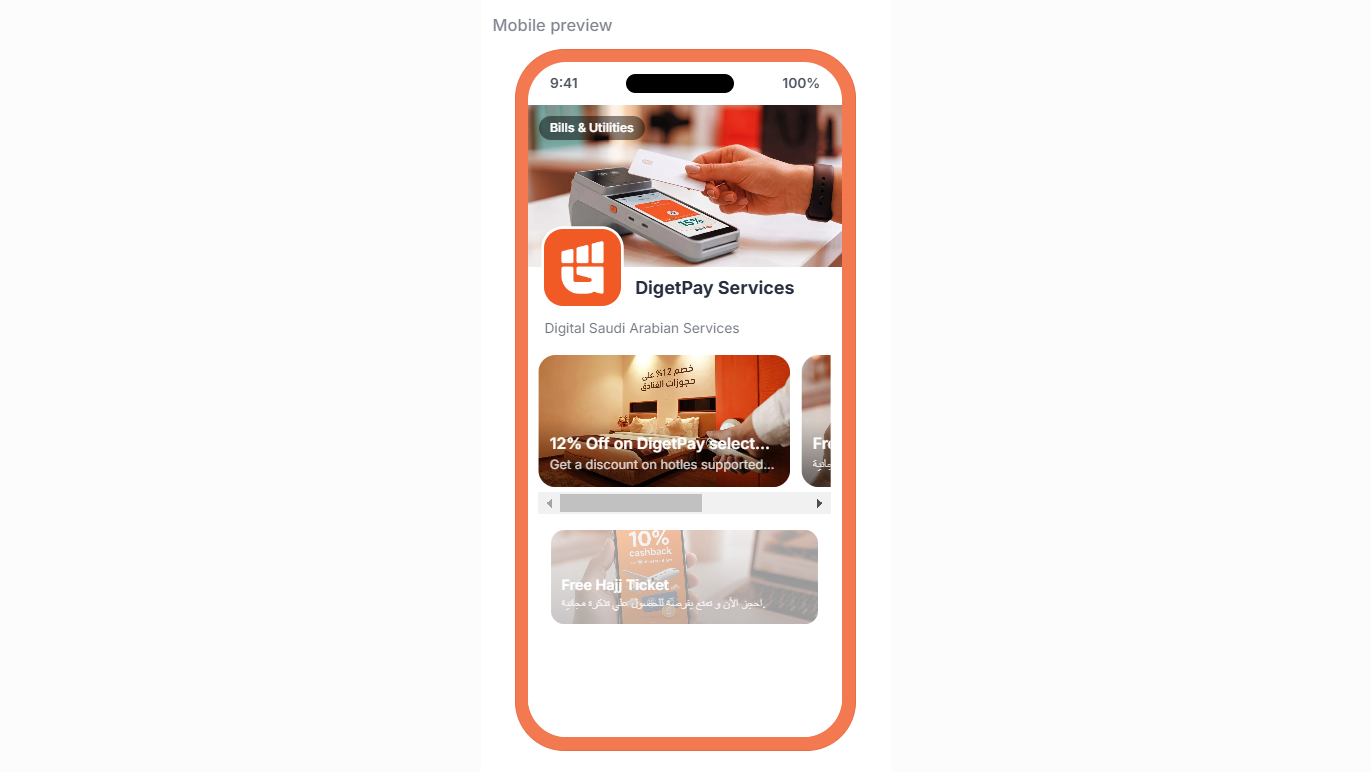
You can customize how your marketplace listing appears on our app through our composable interface.
2. Panel styles
2.1 panelType — what the section accepts
panelType — what the section accepts| Value | Purpose |
|---|---|
OFFERS | Purchasable in-app offers (bought via POST /marketplace/purchase) |
PROMOTIONS | External promos / deeplinks / webviews — no purchase flow |
OCCASIONS | Seasonal / themed campaign (Ramadan, National Day…) |
CARD_GRID | General catch-all; what the app synthesizes from a legacy cards[]-only payload |
INFO | Text-only section (bodyEn/bodyAr), no cards |
2.2 layout — how the row renders
layout — how the row renders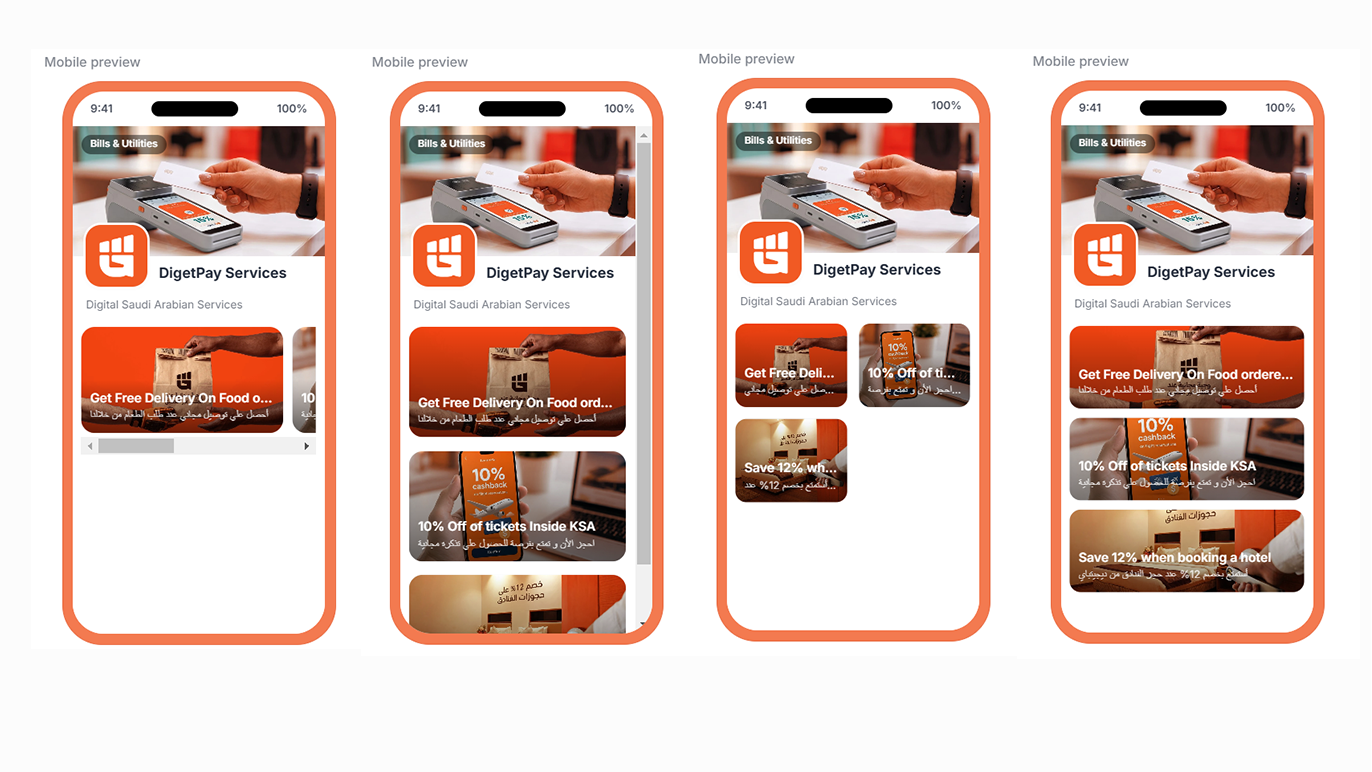
| Value | Look | Recommended for |
|---|---|---|
HERO_CAROUSEL | Swipeable wide cards | OCCASIONS |
GRID | 2-column tile grid | OFFERS |
LIST | Stacked vertical rows (default) | PROMOTIONS / CARD_GRID |
BANNER | Single full-width card, no scroll | one featured hero item |
2.3 Other fields
| Field | Type | Notes |
|---|---|---|
titleEn/Ar | string ≤200 | Section title, shown when showTitle: true |
showTitle | boolean | Default false; mainly used for OCCASIONS |
subtitleEn/Ar | string ≤200 | One-line subtitle |
themeColor | #RRGGBB | Hex accent for the section chrome |
bannerImageUrl | URL/gs:// | Panel hero banner (set via the banner upload endpoint) |
expiresAt | ISO 8601 | Campaign expiry; null = never expires |
bodyEn/Ar | string ≤2000 | Plain body copy — INFO panels only |
featuredStoreId, featuredStoreLabelEn/Ar | — | Featured store reference |
3. Card (offer) styles
| Field | Type | Notes |
|---|---|---|
design | banner | tile | compact | Card visual treatment (required) |
linkType | deeplink | webview | offer | Launch behavior (required) |
url | string ≤2048 | webview needs http(s); deeplink accepts any scheme; offer may be empty |
titleEn/Ar | string ≤200 | Card title (required) |
descriptionEn/Ar | string ≤2000 | Body copy |
imageUrl | URL/gs:// | Card thumbnail (image upload endpoint) |
price | decimal string | Unit price; omit to keep the card non-purchasable |
originalPrice | decimal string | Pre-discount price, shown struck through |
currency | ISO 4217 | Default SAR |
inStock | boolean | Default true; false soft-disables the card |
perUserLimit | int 1–999 | Max purchases per customer |
badgeLabel | string ≤60 | Attention badge (e.g. "Best seller") |
badgeColor | #RRGGBB | Styles badgeLabel |
bannerImageUrl | URL/gs:// | Hero image for the card's detail screen |
highlightText | string ≤200 | Short highlight copy |
termsEn/Ar | string ≤2000 | Purchase terms shown near checkout |
offerExpiresAt | ISO 8601 | After this moment the card is not purchasable |
fulfillmentMode | INSTANT | PARTNER_CONFIRMATION | Default INSTANT |
4. Style recipes
Pick the section type, its layout, and the cards' design to produce each view.
| Desired view | panelType | layout | Card design | Card linkType |
|---|---|---|---|---|
| Seasonal hero carousel | OCCASIONS | HERO_CAROUSEL | banner | offer/deeplink |
| Purchasable 2-column grid | OFFERS | GRID | tile | offer |
| Stacked promos / deeplinks | PROMOTIONS | LIST | tile/compact | deeplink/webview |
| Single full-width feature | PROMOTIONS | BANNER | banner | deeplink |
| Text-only section (how it works) | INFO | LIST | — | — |
| Legacy / unclassified dump | CARD_GRID | LIST | tile | any |
Set showTitle: true, subtitle, themeColor, and bannerImageUrl on
campaigns (OCCASIONS), and bodyEn/Ar on INFO sections.
5. The flow
5.1 Listing lifecycle
stateDiagram-v2
    [*] --> DRAFT
    DRAFT --> SUBMITTED : submit listing
    CHANGES_REQUESTED --> SUBMITTED : submit listing
    REJECTED --> SUBMITTED : submit listing
    SUBMITTED --> IN_REVIEW : admin review
    IN_REVIEW --> APPROVED : admin approves
    IN_REVIEW --> CHANGES_REQUESTED : changes requested
    IN_REVIEW --> REJECTED : admin rejects
    APPROVED --> PUBLISHED : published in Super App
| Status | Meaning | Editable? |
|---|---|---|
DRAFT | Not yet submitted | ✔ |
CHANGES_REQUESTED | Admin asked for changes | ✔ |
REJECTED | Admin rejected | ✔ |
SUBMITTED | Queued for review | — |
IN_REVIEW | Under admin review | — |
APPROVED / PUBLISHED | Live / scheduled to go live | — |
5.2 Panels
| Method | Endpoint | Purpose |
|---|---|---|
| GET | .../listing/panels | List sections with cards |
| POST | .../listing/panels | Create a section |
| PATCH | .../listing/panels/reorder | Reorder sections |
| PATCH | .../listing/panels/:panelId | Update a section |
| DELETE | .../listing/panels/:panelId | Delete a section (must be empty) |
| POST | .../listing/panels/:panelId/banner | Upload the panel banner |
5.3 Cards (offers)
| Method | Endpoint | Purpose |
|---|---|---|
| GET | .../listing/offers | List cards |
| POST | .../listing/offers | Create a card |
| PATCH | .../listing/offers/:offerId | Update a card |
| PATCH | .../listing/offers/reorder | Reorder cards (per panel) |
| DELETE | .../listing/offers/:offerId | Delete / soft-disable a card |
| POST | .../listing/offers/:offerId/image | Upload the card thumbnail |
| POST | .../listing/offers/:offerId/banner | Upload the card banner |
5.4 Worked examples
Create a HERO_CAROUSEL campaign panel via
POST .../listing/panels:
{
  "panelType": "OCCASIONS",
  "layout": "HERO_CAROUSEL",
  "titleEn": "Ramadan Specials",
  "titleAr": "عروض رمضان",
  "showTitle": true,
  "subtitleEn": "Iftar & suhoor deals, all month",
  "themeColor": "#16A34A",
  "expiresAt": "2026-09-18T21:00:00Z"
}
Create a purchasable card inside that panel via
POST .../listing/offers:
{
  "panelId": "12",
  "titleEn": "Silver top-up",
  "titleAr": "تعبئة فضية",
  "design": "tile",
  "linkType": "offer",
  "url": "",
  "price": "49.99",
  "originalPrice": "79.99",
  "currency": "SAR",
  "badgeLabel": "Best seller",
  "badgeColor": "#E8553C",
  "fulfillmentMode": "INSTANT"
}- Omit
panelIdto place a card in the implicitALL_CARDSpanel; set it to
move a card to another section (same listing). priceis a decimal string (≤ 7 integer + 2 fraction digits). Omit it to keep
the card non-purchasable.
6. Rules & limits
- Order: the app sorts
panels[]then each panel'sitems[]bysortOrder
ascending; the reorder endpoints rewrite these. - Implicit panel: a listing always has an
ALL_CARDSpanel once the first
card is authored. - Fallbacks (client-side): unknown
layout→LIST; unknownpanelType→
CARD_GRID. - Deprecated
cards[]: the customer detail API still returns a flattened
cards[](union of allpanels[].items[]) for backward compatibility — build
againstpanels[]. - Limits: max 20 panels and 20 cards per listing.
- Delete rules: a panel must be empty before deletion; a card with existing
orders is soft-disabled (inStock=false) instead of deleted to preserve order
history.
7. Summary
- Compose panels with the right
panelType+layout, and cards with the right
design+linkType, then reorder both to control the exact on-screen view. - Listing content is editable only in
DRAFT/CHANGES_REQUESTED/REJECTED;
submit it for review once the storefront is final.
You can now build and arrange a storefront. Submit the listing via
POST .../listing/submit
to move it into the admin review queue.
Updated about 1 month ago